- Flipping the layout is the easy part. Icons, mixed text, fonts, truncation and forms are where Arabic users feel the difference.
- Test with real content: long names, Latin product names, phone numbers, and the longest screen in the app.
- Ask for start/end layout from day one, and have the Arabic copy written in Arabic, not translated.
Here is how it usually goes. The first version of an app is designed and tested in English. Then someone says, “we need Arabic too,” the strings are translated, the layout flips, and the demo looks right. Two weeks after launch, support starts hearing that the app “feels foreign.”
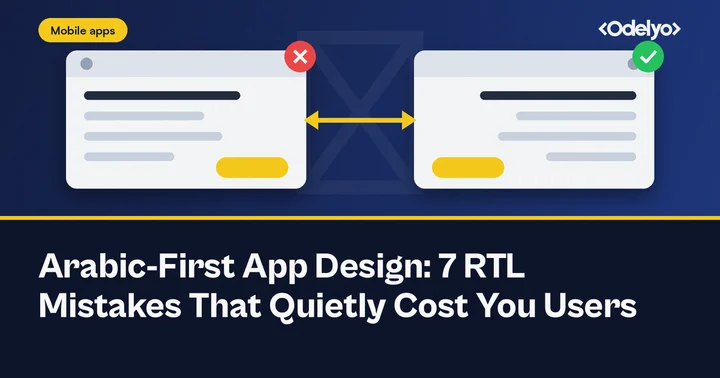
Flipping a layout is the easy ten percent. The rest is a long list of small decisions, and these are the seven we see missed most often.
1. Icons and arrows that point the wrong way
In a right-to-left app, “back” goes right and “next” goes left. A back arrow that still points left makes people hesitate for a half second on every screen, and that half second adds up. The same goes for chevrons in lists, progress bars that should fill from the right, and swipe gestures.
The catch: not everything should flip. Play buttons, clocks, checkmarks, phone and search icons, and brand logos stay as they are. Someone has to decide icon by icon, which is a design task, not a switch you turn on.
2. Mixed Arabic, English and numbers
A product name in Latin letters inside an Arabic sentence, an order number at the end, a price with a symbol. The bidirectional algorithm does its best and sometimes gets it wrong: punctuation jumps to the wrong end, a phone number reads backwards, “iPhone 15” turns into “15 iPhone.”
These bugs only show up with real content, which is why they pass a demo full of neat placeholder text. Ask your team to test with real product names, real addresses, and the longest customer name they can find.
3. Latin fonts and a line height built for English
If the Arabic text falls back to the system font because nobody chose one, it will work, but it will look like an afterthought. Worse, Arabic letters carry dots and marks above and below the line. A line height tuned for English clips them, and buttons crop the text.
Choose an Arabic typeface on purpose, give it more breathing room than the Latin one, and never add letter spacing to Arabic: it breaks the joined letters apart.
4. Text that gets cut off
Fixed-width buttons, single-line labels, and tab bars were measured against English words. Arabic can come out longer or shorter, and a long product name or a Saudi district name does not care about your layout. The result is a truncated “…” at the wrong end, or a label hiding the one word that mattered.
Let components grow, allow two lines where it counts, and check the ellipsis lands at the end of the sentence, not in the middle of the meaning.
5. Hardcoded left and right
This is the one developers can fix once and for all. If a margin says “left: 16”, it will be wrong in one language. The fix is to say “start” and “end” instead: CSS logical properties on the web, and directional padding with Flutter’s Directionality in the app. A codebase written this way flips correctly without a separate Arabic version of every screen.
It is worth asking early. Retrofitting it into a finished app means touching almost every screen.
TipIf the app only works in Arabic because someone patched each screen, the next screen will break it again.
6. Dates, numbers, currency and forms
Small things that decide whether an app feels local:
- Dates: many Saudi users expect the Hijri date next to the Gregorian one, and the week starts on Sunday for many.
- Digits: Western (0-9) and Arabic-Indic digits are both familiar. Pick one, and keep it consistent across screens and notifications.
- Currency: the riyal as “SAR”, “ر.س”, or the new symbol, placed the same way everywhere. Check that your font actually has the symbol.
- Phone fields: a Saudi number starts with +966 and often with a leading 0 people type out of habit. Accept both, keep the number itself left to right, and show the keyboard for digits.
- Names and addresses: do not force a first and last name split, and allow Arabic input in every field, not just the ones you thought of.
7. Translation instead of Arabic-first thinking
The deepest mistake is the one behind the other six. A translated app keeps English structure: short imperative buttons, English-style microcopy, onboarding written for a different audience. Arabic readers notice when the tone is stiff or when a phrase sounds like it came from a dictionary.
Arabic-first means writing the Arabic copy yourself, with someone who speaks it, and designing the main flow with Arabic text in it from the start. English can be the second language of the app, and often it is, for Saudi businesses.
A short check before you approve a build
Open the app in Arabic and do five things: go back from three different screens, type a Latin product name into a search box, enter a phone number, open the longest screen with the longest content, and read the notification text out loud. If anything feels odd, it will feel odder to the customer.
Building for Saudi or Gulf customers? We design in Arabic from the first wireframe and test with real content before anything goes live. Tell us what you are building and we will suggest where to start.
Related reading
See a related case study: Al Yasmeen. An Arabic-first shopping app for a food-products company, designed around Arabic customers from the first screen instead of adapted later.
Service page: Flutter app development.
Have an app or website that was built in English first?
Send us a few screenshots. We will point out what breaks in Arabic, and what it would take to fix it properly. Send a brief · WhatsApp us. You get a first reply within one business day.